Build Your Own B2B Sales Tracker With Claude AI. In Hours, Not Days.
Lead tracking made simple. Minimal time. Minimal effort with Claude.
Your leads, your notes, and Claude doing the research, the scripts, the emails and the letters. Build the sales tracker yourself, no coding, and get a full working day back every week.
Written by a working B2B sales rep. Every prompt in the book comes from a real build.
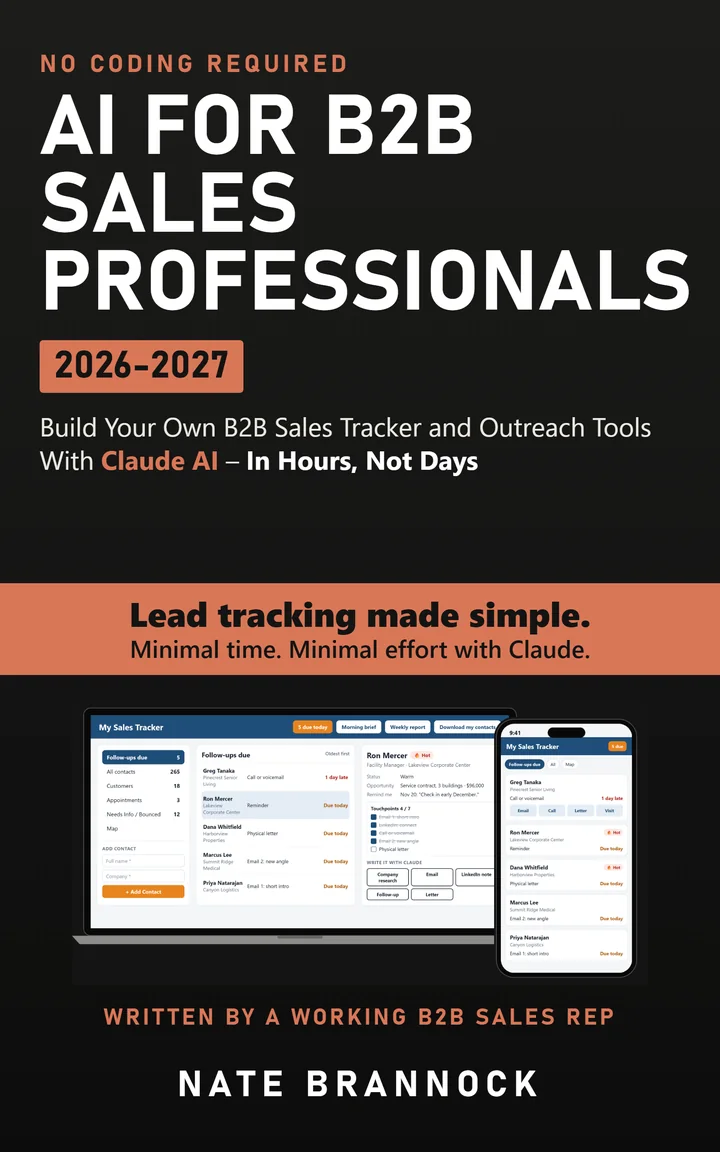
One Clean Screen for Every Lead You're Working
A private sales tracker on your computer and your phone. It tells you who's due today and what touch comes next, and it writes the email, the LinkedIn note and the letter in your voice.

The tracker built for this book. Yours can look however you want.
Move On From Rev 27 of the Same Spreadsheet

The Old Way
- Spreadsheets, sticky notes and a stack of business cards
- "Rev 4" for this week, and hoping last week's notes saved
- Half of what you know about each deal lives in your head
- The clients you talk to every week get your time. Everyone else waits.
- Good leads go quiet because something else took over your week

With Your Tracker
- A Follow-ups due list that tells you who to reach out to and how
- Your notes, history and research on every contact, on your phone
- Claude researches the company and writes the email, the note and the letter
- Your weekly report ready before your sales meeting, in one click
- Update it by talking instead of typing, right from the parking lot
The System Comes First
The book walks you through building your own sales tracker, and it also shares the B2B sales methods I actually use: the seven-touch follow-up system, cold emails and letters that get replies, account research in minutes and a weekly report that's ready before your sales meeting.
My seven touches from Chapter 2. Your tracker puts them on every contact and tells you which one is next.
What You'll Build, Chapter by Chapter
Every build chapter gives you the words to say to Claude Code, what you should see, and what to do if something goes wrong.
Part 1: Why You Can Build This Now
A reason and a system, then your desk and accounts ready.
- 1Why Every B2B Rep Needs a TrackerThe leads that went quiet, and what a tracker does that a spreadsheet can't
- 2The System Comes FirstYour seven-touch follow-up plan on one page, before any AI
- 3What This CostsWhich Claude plan you need. A lean first year is about $200
- 4Your Starter KitDesk, apps and connectors for day one, and your About Me file
Part 2: Build the Tracker
From a blank page to a private tracker on your laptop and your phone.
- 5Talk to Claude Like a BossHow to ask, how to say "that's wrong," and your first prompt
- 6Build Your Sales Tracker, Version 1.0Your contact list, Due today, an Add contact box and one-click touches
- 7Your Tracker, Your WebsiteIts own web address and your own sign-in, so it works on your phone
- 8Load Your Contacts and Clean ThemAn Import button that catches duplicates and cleans your list
- 9Make It Look Like YoursYour colors, a phone view and buttons that are easy to tap
Part 3: Keep Building, Make It Sell
Follow-ups that come to you and touches that make you stand out.
- 10Build Your Follow-UpSeven touches on every contact, reminders, warmth badges and a map
- 11Your Numbers in One ClickA weekly report with new leads, touches and opportunities
- 12Outreach Buttons That Write in Your VoiceAI prompts for company research, cold email, LinkedIn notes, follow-ups and letters
- 13Letters and One-Pagers Nobody Else SendsPersonal letters, address labels and 150 letters in under two working days
- 14Research in MinutesDated research notes on every contact and a weekly industry brief
- 15Email in Small BatchesCold emails and follow-ups you approve and send from Claude Code, each one logged
Part 4: Keep It Running
What to do when something breaks, and where to go next.
- 16When It BreaksHow to describe a problem so it gets fixed, and a way back
- 17Your Employer, Your DataStaying inside your company's rules for customer data and email
- 18What to Build NextPrep sheets, a morning brief and a won and lost log
- +Bonus: The Real Story of How I Built My TrackerWhat went wrong on my own build, how each fix went, and how long it really takes
Why I Wrote This Book

My "sales tracker" was an Excel file that I either updated every week or forgot to. I can't count how many revisions I went through, but in a given year I think I got up to "rev 27" or 28. Finding the right file was hit or miss.
Half of what I knew about each deal lived in my head. The clients I talked to every week got my time. Everyone else waited, and some of them waited too long.
Today it looks different. Before I walk into a building, I open my tracker on my phone and see the contact's name, what we talked about last, my next step with them and any research Claude found about their company. I walk in prepared.
I'm a working B2B sales rep. Yes, I have a quota. I've managed and mentored other B2B reps. I've also never written a line of code in my life.
Everything in this book comes from my own sales tracker, which I built with Claude. Today it holds 265 well-developed leads. It's how I mailed over 150 personal letters in less than two working days, and it's why I get at least a full working day back every week.
Let me be clear about one thing: your tracker won't sell for you. You still do the selling. What it does is make your job easier. It keeps you organized and makes sure no lead slips through the cracks. Touches that used to take hours now take minutes, and that time goes back into selling.
Read the First Pages
The title page, the contents and the full introduction. Tap any page to read it.
You'll Get the Most Out of It If
- You have more than about 50 contacts you're working at once
- Your sales take weeks or months to close
- You juggle selling with account work, client check-ins or leading other reps
- Your role is a bit of a hybrid, and it's hard to stay focused on your leads
- You use ChatGPT or Claude AI for emails and want it to do more
- You don't code, and you don't plan to start
Who It Isn't For
- You sell to consumers
- You close in one phone call
- You want AI to do the selling for you
This one gives you a system and the tools to run it. You still do the selling.
Not in HVAC? Good.
My examples come from my world. Software, insurance, staffing, logistics, equipment, marketing or professional services: swap in your own buyer and your own product, and every step works the same way.
Get Claude to Sound Like You
You read the email Claude just wrote. The grammar is fine. You'd never send it.
This free kit fixes that. In about 30 to 45 minutes, Claude interviews you and writes a short profile of your work, your voice and your judgment: what you sell, who you serve, how you communicate, and what you should never promise. Then it reads that profile every time you work in your tracker folder. Better first drafts, fewer repeated corrections.
- START_HERE: the step-by-step guide with every prompt ready to copy
- The About Me template: the fill-in profile Claude completes with you
- A finished example for a made-up rep, so you can see the level of detail
- The setup snippet that connects your profile to your tracker folder
Before You Buy
Do I need to know how to code?
No. You describe what you want in plain English, typed or spoken, and Claude Code builds it. I've never written a line of code, and every chapter gives you the exact words to say.
How long does it take?
About 12 to 15 hours from start to finish, spread over a week or two. You'll have a working version on your computer in the first few chapters, and every chapter after that adds one piece.
What does it cost to run?
Everything in the book works on Claude Pro, which is $20 a month. The database and the web host for your tracker are free. A lean first year is about $200. Chapter 3 lays out every cost before you spend anything.
I don't sell HVAC. Will this work for me?
Yes. The examples come from my world, and the book shows how to swap in your own buyer, product and reasons for reaching out. If you sell to businesses and your sales take weeks or months, it fits.
What about my company's rules and customer data?
Chapter 17 covers it: your employer's rules for customer data and email, what to ask IT, and how to stay out of trouble.
What's in the members area?
Every prompt in the book with a copy button, the About Me kit, a sample of my letter format, the seven-touch planner, the import template and more. The code is on the "Your members area" page near the front of the book.
What are the best AI tools for sales reps?
The one that knows your accounts. Most AI tools for sales reps start from a blank chat window. The tracker in this book keeps your contacts, notes and touch history in one place, so Claude can research the company and write the email, the LinkedIn note and the letter with the full picture.
Can I build my own CRM with Claude?
Yes, and you don't write any code. I call it a sales tracker because it's built around your follow-up, not a company database. It runs on free accounts at its own web address and works on your phone.
Does it work for outside and independent sales reps?
That's who I built it for. I'm out in the field most weeks, so it shows who's due today, has a map for planning drop-in days, and lets you update a contact by talking from the parking lot.
Is there anything for sales managers?
Yes. Chapter 11 builds a weekly report for your sales meeting in one click, and the members area has a bonus chapter on a team version for managers.
Is this an official Anthropic book?
No. It's an unofficial guide written by a sales rep who uses Claude every day. It isn't affiliated with or endorsed by Anthropic.
Your Site. Your Tracker. Your Pipeline.
Build the sales tracker that actually helps you sell.